
SMS Notifications
SchoolBanks can text parents and guardians about fee and tuition payment activity. Here's how to turn it on, what you'll receive, and how to opt out.
How to Opt In
SMS notifications are off by default. To turn them on:
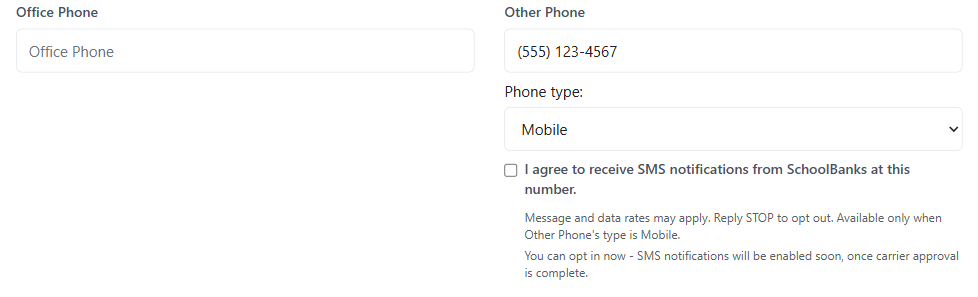
- Log in to your SchoolBanks account and go to My Account > Profile.
- Enter a mobile number in the Other Phone field and set Phone Type to Mobile.
- Check "I agree to receive SMS notifications from SchoolBanks at this number."
That's it — no separate app or download required. You can turn notifications off again at any time from the same screen, or by replying STOP to any message.
What You'll Receive
Once you opt in, SchoolBanks may text you about your enrolled student's school fee and tuition payment activity, including payment due reminders, payment confirmations, and balance alerts.
Message frequency varies depending on your account and payment activity. Message and data rates may apply. Consult your mobile carrier for details on your plan.
Opting Out
You may opt out of SMS messages at any time by replying STOP to any message you receive from us. You'll get one final message confirming your opt-out, and no further messages will be sent unless you opt back in. For help, reply HELP to any message, or contact us at [email protected] or (770) 520-8496.
Your Number Is Never Sold
Text messaging originator opt-in data and consent will not be sold, shared, or disclosed to third parties or affiliates for marketing or promotional purposes. Carriers are not liable for delayed or undelivered messages.
This SMS program is separate from and does not affect your other SchoolBanks account communications or notification preferences.
Learn More
Full details on how SchoolBanks collects, uses, and protects your information, including this SMS program, are in our Privacy Policy (Section 11, Text Messaging / SMS Communications) and Terms of Service.